


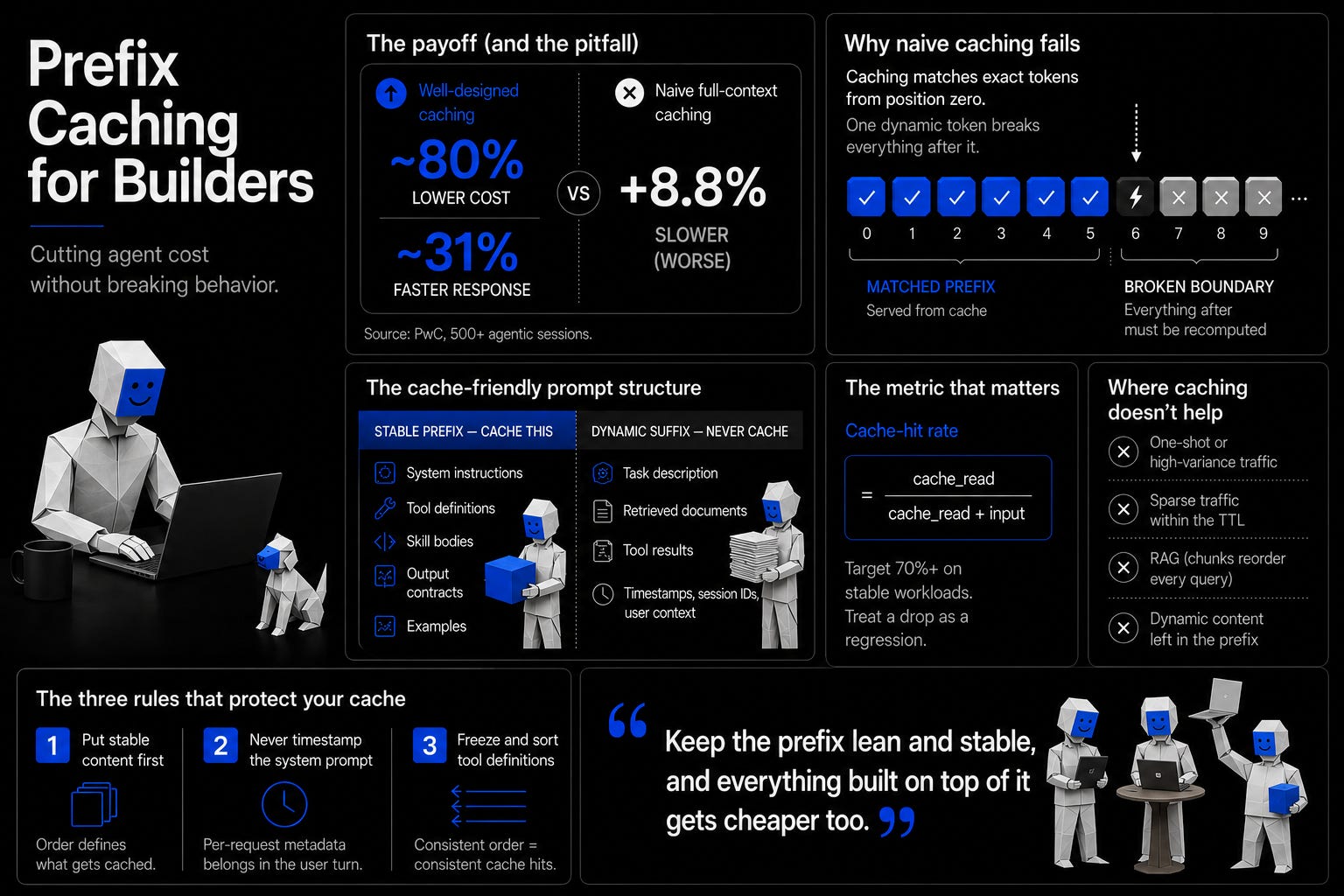
Prefix caching is one of the most measurable ways to cut agent cost, but it is just as easy to misconfigure, where it saves nothing, adds latency, or quietly changes what your agent does. When PwC ran more than five hundred agentic sessions across OpenAI, Anthropic, and Google, they found that the best caching strategies cut cost by around 80% and time to first token by 31%. But naively caching the whole context, which is often a common setup, actually made latency worse.
The good news is that the failure modes are understood, and most of them come down to a handful of habits you can fix.
Part 1: What caching is
The model only reasons over what it sees
Everything an agent does comes down to what is in front of the model at inference time. The model has no access to anything outside that window, so success depends less on how you word the prompt and more on what actually fills that window. This includes the system prompt, tool definitions, memory, history, retrieved documents, all of what constitutes context engineering.
Anthropic’s Effective Context Engineering for AI Agents post, states that the guiding principle is to find the smallest possible set of high-signal tokens that get you the outcome you want. Even with enormous context available through code, markdown files, and external references, most of the value comes from a few high-signal instructions, while the rest adds noise, maintenance burden, or token overhead.
While there are wider layers to engineer like the environment the agent runs in (harness engineering) and the loop that drives it (loop engineering), the cost still concentrates in the context (context engineering). Every token in the context window gets processed on every turn, and caching is what lets you reuse that curated window without paying the full price each time. If you get it right, everything built on top of it gets cheaper too.
Not all caching is the same
Prefix caching is one of a family of caching techniques that sit at different layers of the stack, and it helps to know where it falls before going further. From the top of the stack down:
Prefix caching sits at the provider API level. As a model generates, it stores the intermediate state for tokens it has already processed so it doesn’t recompute them. This is KV caching. Prefix caching extends this idea of KV caching across requests, so when calls share the same leading tokens, such as a stable system prompt and tool definitions, the state for that prefix is stored and reused. It is also referred to as prompt or context caching and is the layer most builders actually control.
RadixAttention and PagedAttention sit at the serving-engine level. SGLang’s RadixAttention builds a tree of token sequences and automatically detects when requests share a prefix. vLLM’s PagedAttention does a block-level version that mainly reduces memory fragmentation. These only matter if you run your own inference stack.
Semantic caching sits at the application level. It returns a stored answer for a query that is similar but not identical. Since an approximate match can return an answer that doesn’t quite fit the question, it is lossy. This makes it a fit for simple FAQ-style questions rather than precise ones.
Session caching sits at the application level. It keeps track of a conversation’s growing history within a set time-to-live for multi-turn use.
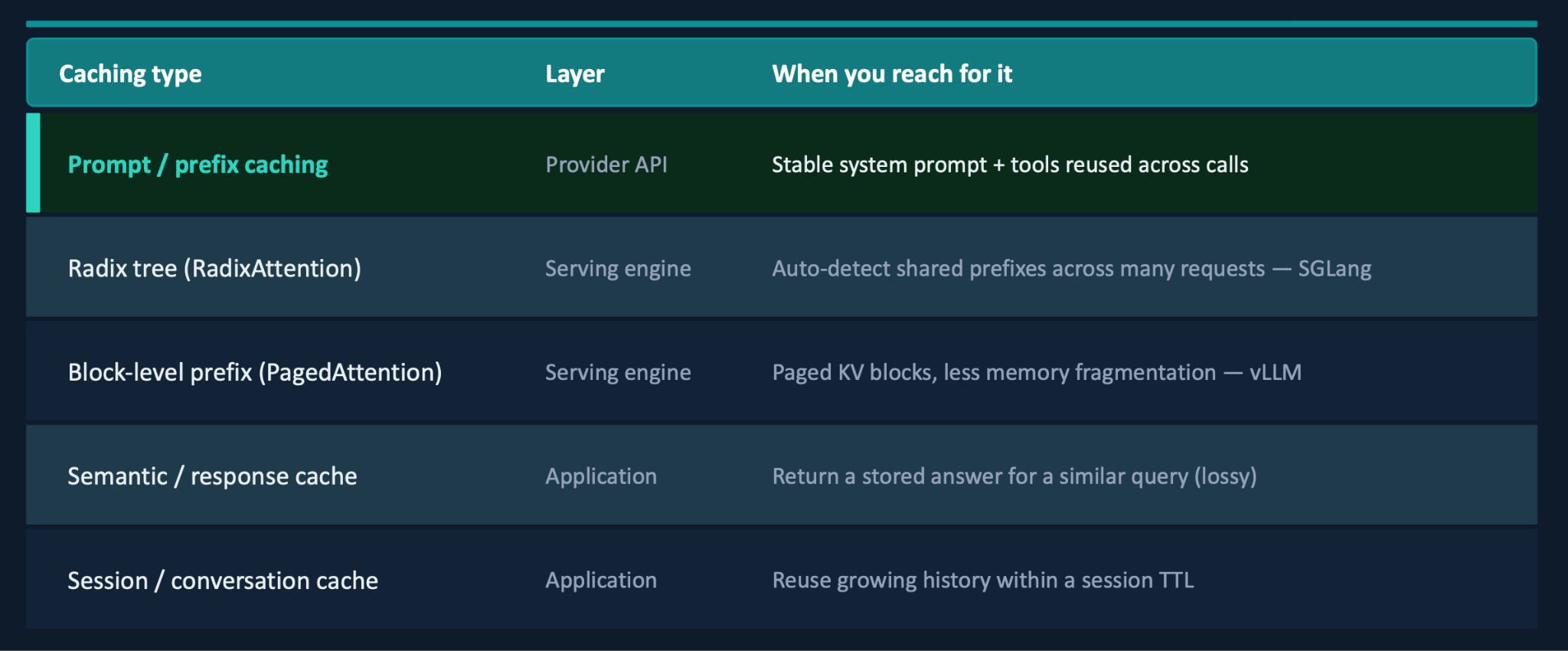
Most builders only ever touch the top row. The serving-engine layer is something we will come back to when we get to eviction.
Why just turning it on fails
So why would caching ever make things slower? It comes down to how the match works. Rather than looking for a prompt similar to one it has seen, the provider matches exact tokens, running left to right from the very first one and stopping only until it reaches a token that differs from last time. Everything up to that first difference is the stable prefix (the leading tokens that are identical on every call) and it gets read straight from the cache. Everything after it has to be recomputed which is what makes a single dynamic value so expensive.
Say you put a timestamp near the top of the prompt. This becomes the first point of difference, so the cache holds only up to that line. The model then recomputes everything below from scratch including the tool definitions, skill bodies and examples, even though none of that content changed.
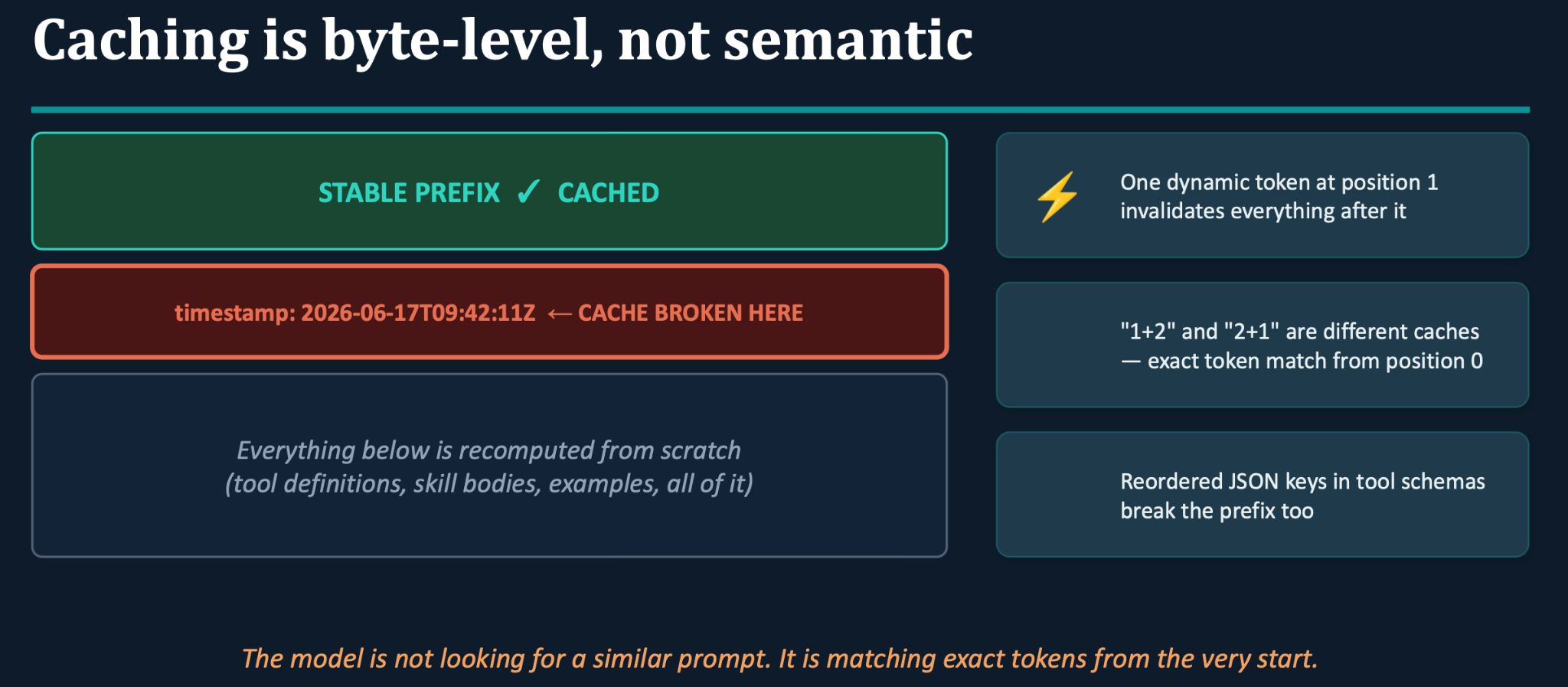
This is also why reordered JSON keys in your tool definitions can wreck a hit rate. If your app builds tool schemas at runtime, filters them by permissions, or serialises them with a library, you have to account for the key order that comes back. Otherwise you end up with tools that are semantically identical but hash to different bytes, which means zero cache hits and a lot of needless recomputation. The model is matching exact tokens from the very start, not reading for meaning.
Part 2 : Doing it right
The anatomy of a cache-stable prompt
Cache-stable prompts follow one layout rule: put everything stable first so it can be cached, and everything that changes last so it can’t break the prefix. A recent blog post on cache-aware skill design breaks this down.
Keep your system instructions, tool definitions, skill bodies, output contracts, and few-shot examples, in that exact order, in the stable prefix. These are the things that stay the same on every request. A single whitespace character in the stable section is enough to break the prefix so it is best treated like a build artifact. You version it, keep it frozen, and change it only when you genuinely need to or when you’ve missed something important. Everything that changes belongs in a dynamic suffix that never gets cached. Things like the task description, retrieved documents, tool results, timestamps, session IDs, and user context go there.
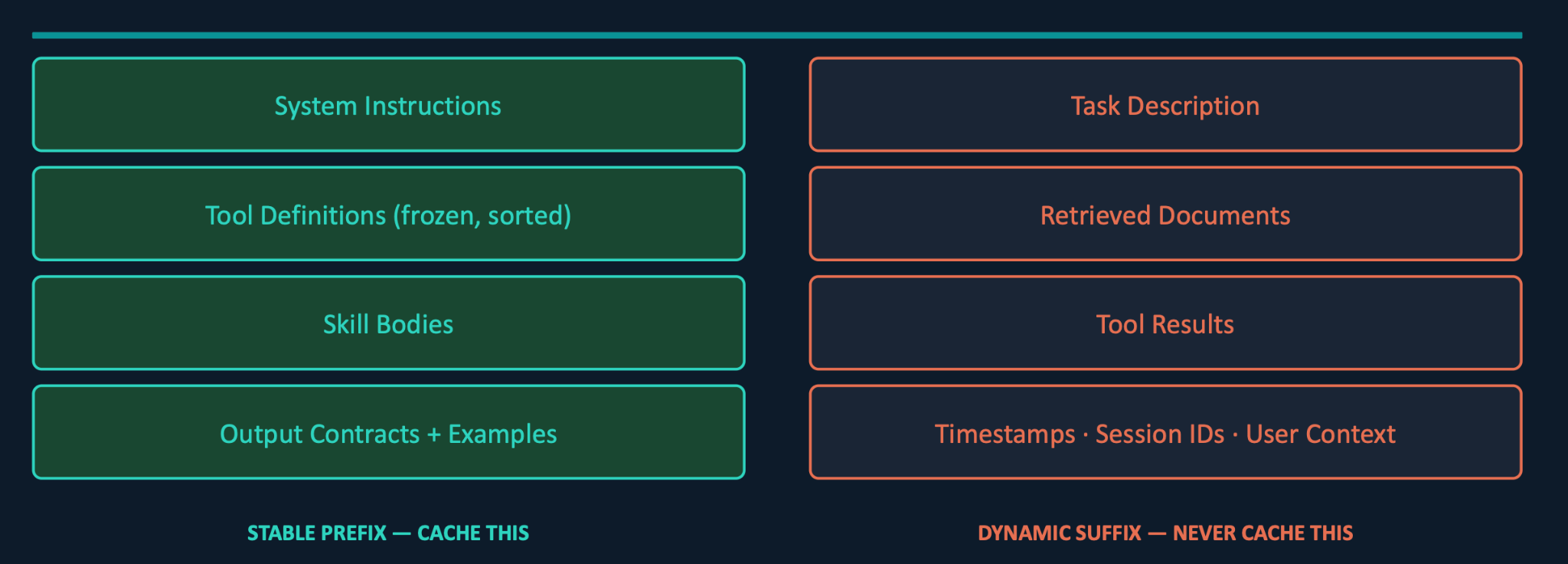
Providers differ on the exact order: Anthropic’s is tools, then system, then messages, while OpenAI generally wants the system prompt first, then tools and definitions. Beyond the ordering, two other rules are important to follow:
Never timestamp the system prompt. Per-request metadata belongs in the user turn, not the top of the prompt. One timestamp at the top of a 20k token prompt means zero cache hits, every single time.
Freeze and sort your tool definitions. If you assemble schemas at runtime, you can end up with structurally identical tools that serialise to different bytes. Sort the keys and pin the serialisation order before you send them.
How you actually mark something as cacheable depends on the provider. Some enable prefix caching automatically and simply reward you for keeping static content at the front. Others make it explicit. With Claude’s Messages API, for example, you send an ordered set of blocks, tools, then the system message, then the user message, and you attach a cache_control parameter set to ephemeral on the block you want cached up to. That’s the signal that tells Claude to cache everything to that point. When you are sending ordinary chat messages through a consumer interface, this is handled for you internally and most of the manual work applies only when you are building against the API directly.
Measuring the hit rate
There are plenty of situations where everything looks set up correctly and you still aren’t getting the benefit so it is important to measure whether caching is actually working.
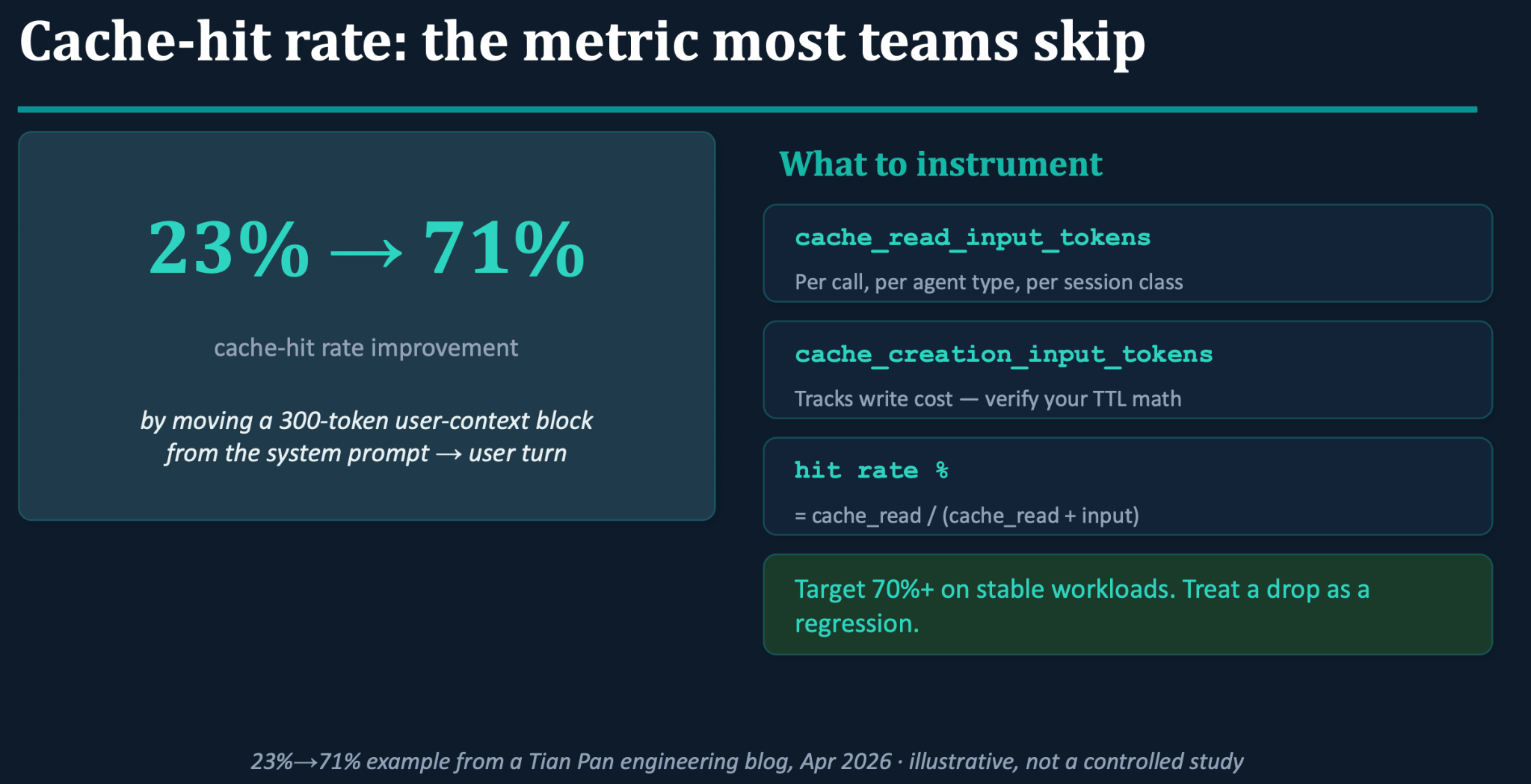
The core metric is hit rate, the fraction of your input served from the cache, which you can think of as cache_read / (cache_read + input). Log it per call type and per agent type, set a threshold, and treat it the way you would treat latency spikes or error rates. If the number drops, treat it as a regression and find out what changed.
One team found that moving a 300 token user-context block out of the system prompt and into the start of the user turn, increased the hit rate from 23% to 71%. The block had held a user-specific ID that was breaking the cache for everyone. Once it moved to the user turn, the system prompt’s token usage became identical for every user in the organization and the cache could finally do its job.
Two more signals are worth instrumenting.
cache_read_input_tokens tells you what you are getting back per call, and
cache_creation_input_tokens tracks your write cost so you can sanity-check the TTL math.
On stable workloads, a target of 70% or higher is reasonable. As a related aside, a rising output-token ratio is a sign your agent is getting too verbose, and something as small as adding “be concise” to the cached system prompt has been shown to cut output costs by roughly 15 to 20%.
What a clean prefix is worth
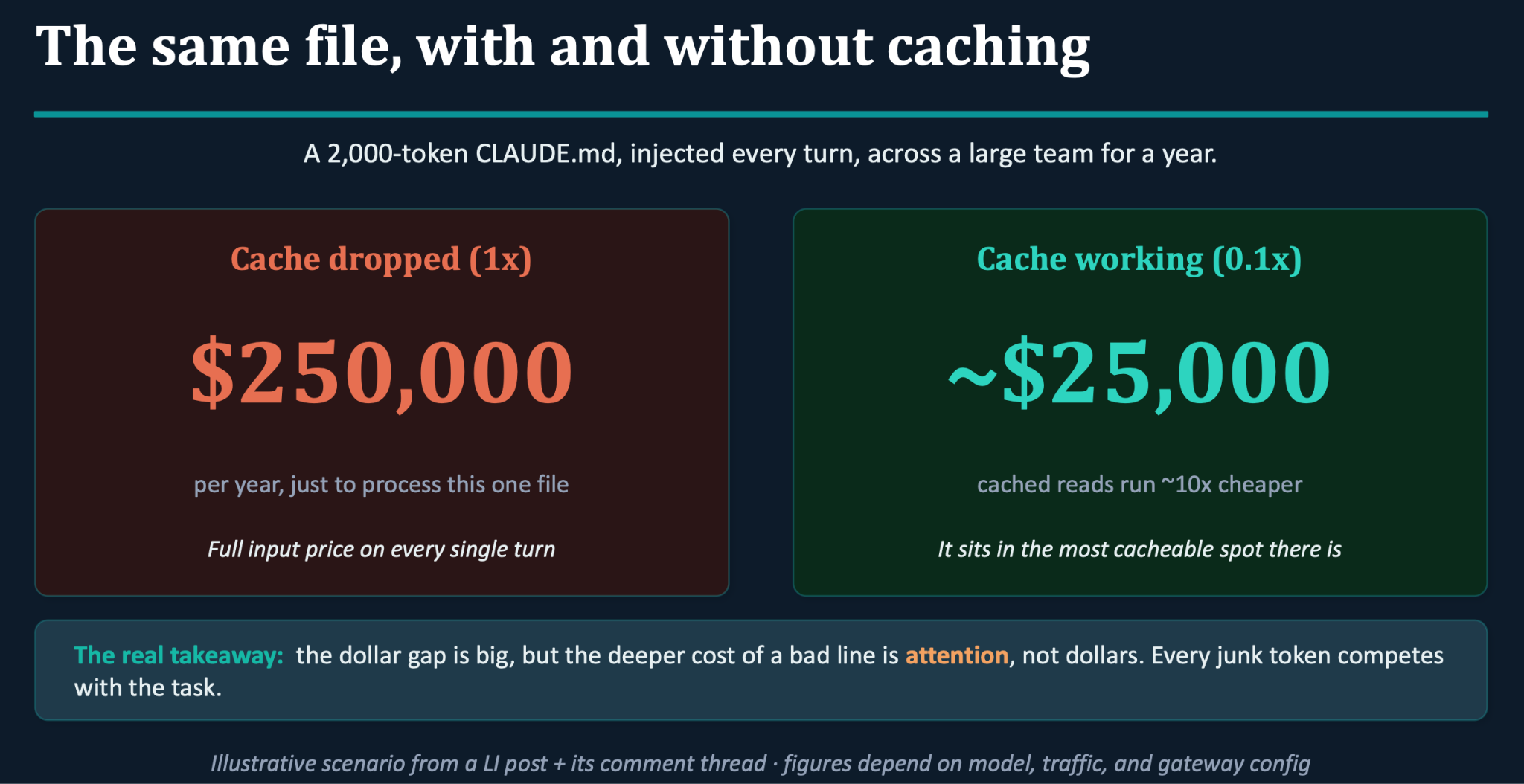
A LinkedIn post illustrates this well with a scenario where a CLAUDE.md file is injected into every conversation with a coding agent. A 2K token file sent on every turn across a large team for a year, can cost around a quarter of a million dollars just to process. However, if that same file sits in the most cacheable spot there is, right at the front of the prompt, caching reads it back roughly ten times cheaper and drops the real cost to about 25K. For a large company, that is probably close to a rounding error, so why does it matter?
It is important because cost is only one part of it. Every line in that file also competes with the actual task for the model’s finite attention budget, so a weak or redundant line costs you in wrong turns and re-prompts, not just in tokens.
Part 3 : Where caching still doesn’t save you
The PwC study shows two sides: what caching is worth, and how it backfires when misapplied. The study set out to measure the ROI of caching for multi-turn agents rather than simple chatbots, using a 10K token system prompt. The researchers simulated a real production environment and asked the agent to autonomously run web searches and produce PhD-level research reports across different fields. It wasn’t run at a massive scale, so treat the exact figures as directional rather than gospel.
They compared three strategies.
Full-context caching stores everything, including tool results and conversation history.
System-prompt-only caching stores just the system prompt.
A third strategy excludes tool results while keeping everything else.
On most strategies the results are strong on both cost and speed, with one exception: naively caching the full context on GPT-4o. The same GPT-4o that saw a healthy time-to-first-token improvement on system-prompt-only caching performs badly when the whole context is cached. The cost saving is still there, but the speed gain reverses.
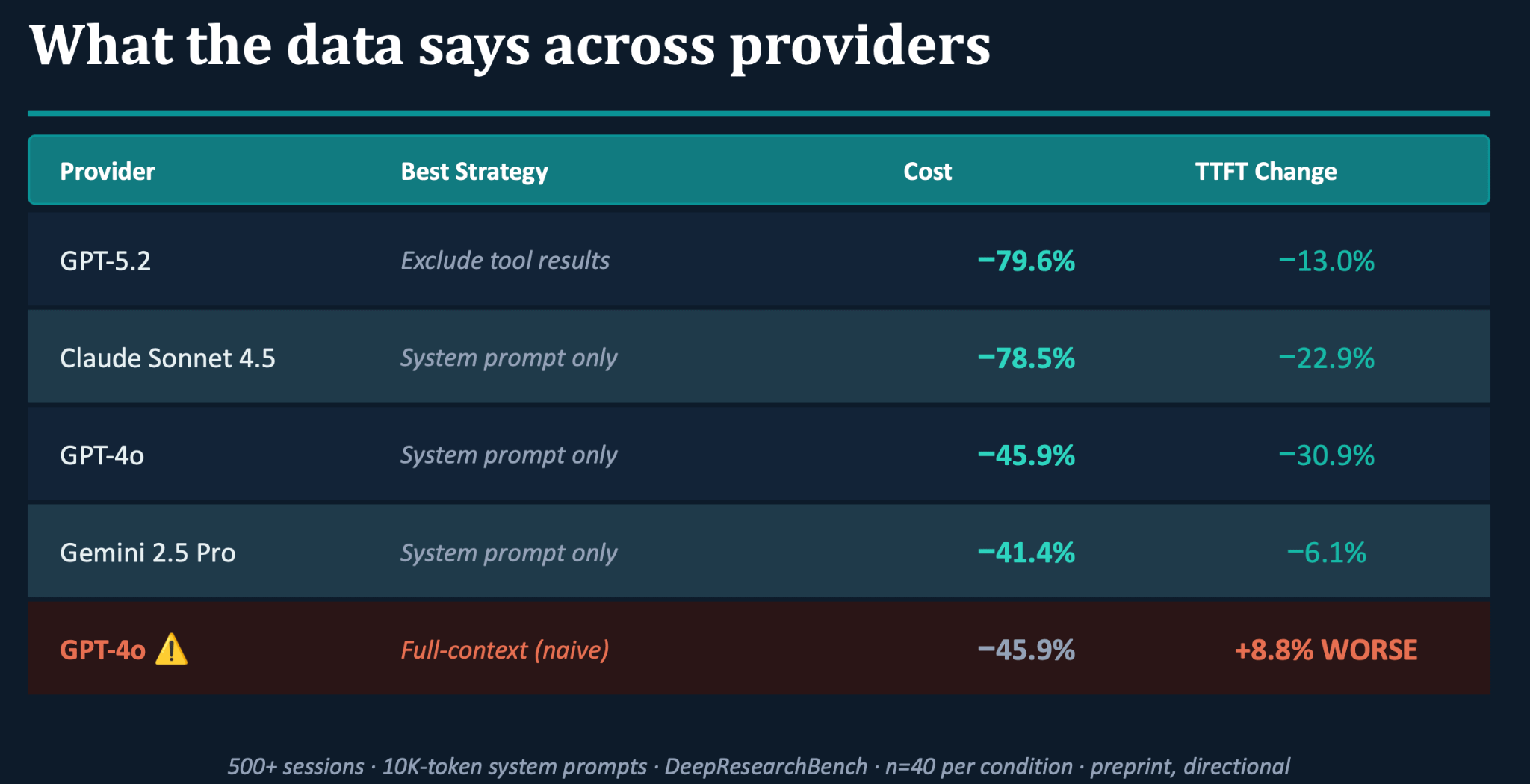
The reason ties straight back to the byte-level matching from Part 1. The system spends time writing dynamic, non-reusable tool results into the cache, and that write overhead never gets paid back because those specific results aren’t needed in future sessions. You pay the cost of caching and never collect the benefit. It is the clearest illustration of a rule that recurs across the literature: caching everything is an anti-pattern.
That failure is the first of several. Even with a clean structure and a healthy hit rate, there are places where caching does nothing for you or actively works against you, each with a different cause and a different fix.
The cases where there is nothing to reuse
Some setups can’t cache well no matter how you structure them:
One-shot or high-variance traffic. When every request carries a different prefix, there is nothing to match and you get zero hits. You pay the write cost and never earn it back.
Sparse traffic. A cache entry only pays off if it is read back before it expires. On low or occasional traffic, it often expires unused, so you keep paying to write a cache nobody reads. Anthropic, for instance, needs one read within the five-minute window to break even, or two within the one-hour one. Exact numbers vary by provider, but as rough anchors, caching usually kicks in somewhere around 1K to 4K tokens and entries live for anywhere from 5 minutes to 24 hours.
Dynamic content in the prefix. A timestamp or a session ID near the top drops your hit rate to zero on its own. If you can’t move it out, caching isn’t worth turning on.
The next few are trickier because they can come up even when your prompt is structured perfectly.
When the cache fills up: eviction
The serving engine has finite GPU memory and when the cache fills, something has to go. The default rule almost everywhere is LRU (least recently used), the same policy you see in databases.
For agents, LRU is a surprisingly bad fit. Picture a multi-agent workflow where one agent finishes its turn and hands off. While it waits to be called again, its cached prefix just sits there and because the other agents in the workflow are active, it becomes the least recently used thing in memory. LRU evicts it. When it’s called again, it recomputes everything from scratch. You can structure the prefix perfectly and still lose, because the eviction policy doesn’t understand the workflow.
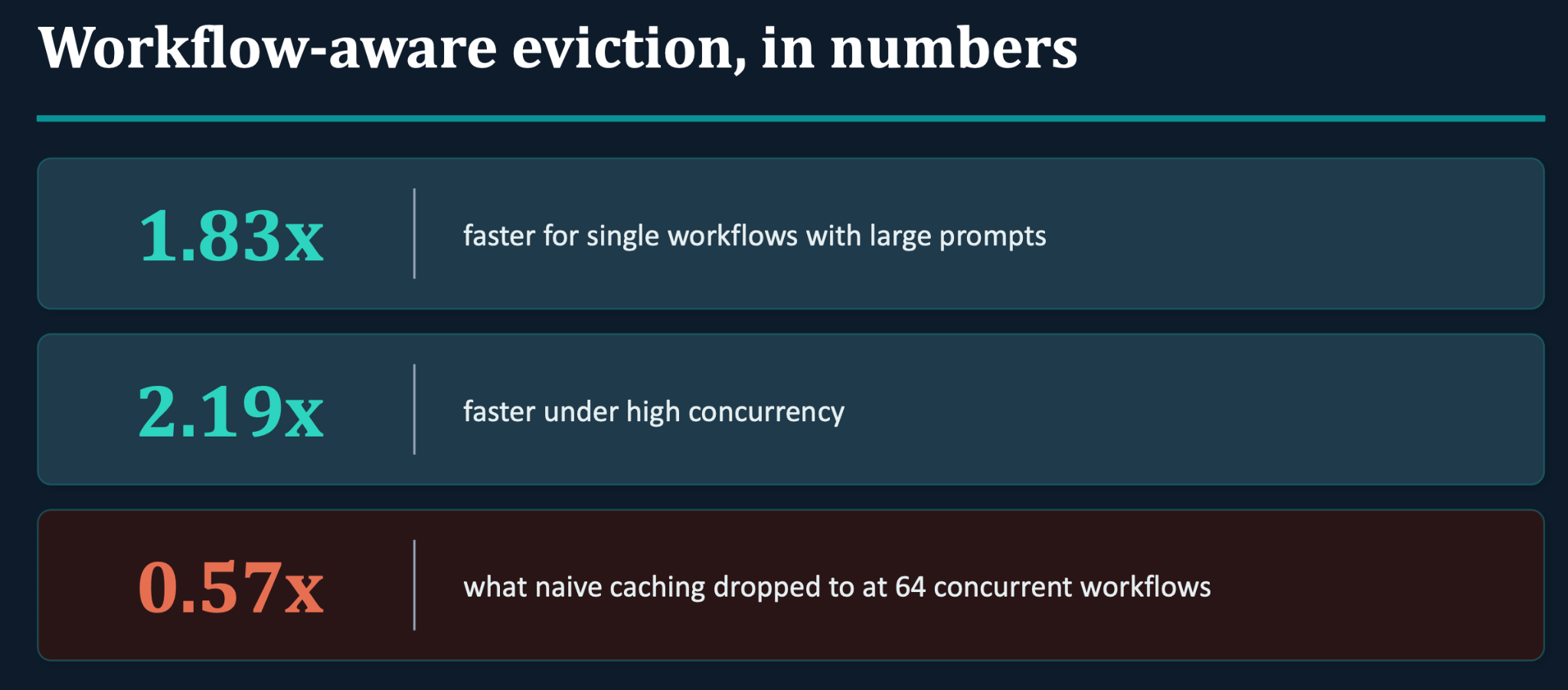
Pan et al. tackle this with KVFlow, a workflow-aware alternative to LRU. Because it knows which agent runs next, it can hold on to the prefix that agent will need, drop the ones that are actually finished, and fetch the next prefix back before the agent is called.
On a single workflow with a large prompt, KVFlow ran about 1.83x faster. Under high concurrency, where memory is tightest, that rose to 2.19x. Naive caching went the other way, dropping to 0.57x of the plain baseline, so under load it was actually slower than doing no clever caching at all. That is the same problem of paying to cache what you can’t reuse, this time at the eviction layer.
The honest caveat is that you can’t control eviction through a provider API. That is the provider’s job. Treat this as a know-it-exists topic unless you self-host on something like vLLM or SGLang, in which case it becomes a real lever.
RAG breaks the prefix by design
RAG is another place where a stable prefix simply doesn’t hold. In a RAG pipeline the retrieved chunks change on every query and get reordered by relevance score, so no two requests share a prefix. That leaves you with a near-zero hit rate on exactly the content prefix caching was meant to help with.
Naively reusing the KV cache from old requests for the new chunks makes it worse, not better, because you lose the cross-attention between chunks and quality drops. The CacheBlend paper, a EuroSys 2025 best paper, offers a middle path. You reuse the cached KV for each chunk, then selectively recompute only a small fraction of the tokens (5 to 18%) carrying the cross-attention, so the model still understands how the chunks relate. The reported results are near-zero quality loss, 2.2 to 3.3x faster time to first token, and a near-100% effective hit rate.
Caching only handles the static half
Caching does well by the static half of your context like the system prompts and tools. The dynamic half, like the agent’s memory and history, is another matter. It degrades in ways caching can’t touch. Your Agents Are Aging Too lays out four of them, all of which happen while the model weights sit perfectly still:
Compression aging: Summarising memories at write time drops a detail you turn out to need later.
Interference aging: Similar memories pile up and bury the right one. Ask about John Smith and you get John Smyth, because the more common name wins.
Revision aging: State changes, but the derived copy in memory never gets updated.
Maintenance aging: A flush or a re-compaction quietly breaks things, for example by sumarising a whole chat and destroying the exact-match content prefix caching relies on.
Caching keeps the stable context cheap and reliable, but none of that touches the moving parts. Memory has to be engineered on its own, right alongside the caching work.
Restructuring for caching can break behavior
There is a subtler risk running through all of this. When you restructure a prompt for cache stability, moving blocks around and consolidating instructions, you are changing the prompt, and that can change behavior in ways you didn’t intend.
In the paper What Prompts Don’t Say, researchers found that LLMs infer underspecified requirements by default about 40% of the time. They are good at guessing formatting and terrible at guessing conditional rules. They also confirmed the intuitive result that piling too many instructions into the prefix makes instruction-following worse, whether from conflicting evidence, sheer volume, or both. They define underspecification as leaving essential requirements out of the prompt on the assumption that the model will fill the gap with common sense. Those implicit behaviors, the ones you never wrote down, are exactly the ones most likely to regress when you touch the prompt. On their data, roughly 41% of unspecified requirements were met at 98% accuracy or better, but those same behaviors were about twice as likely to regress when the prompt changed.
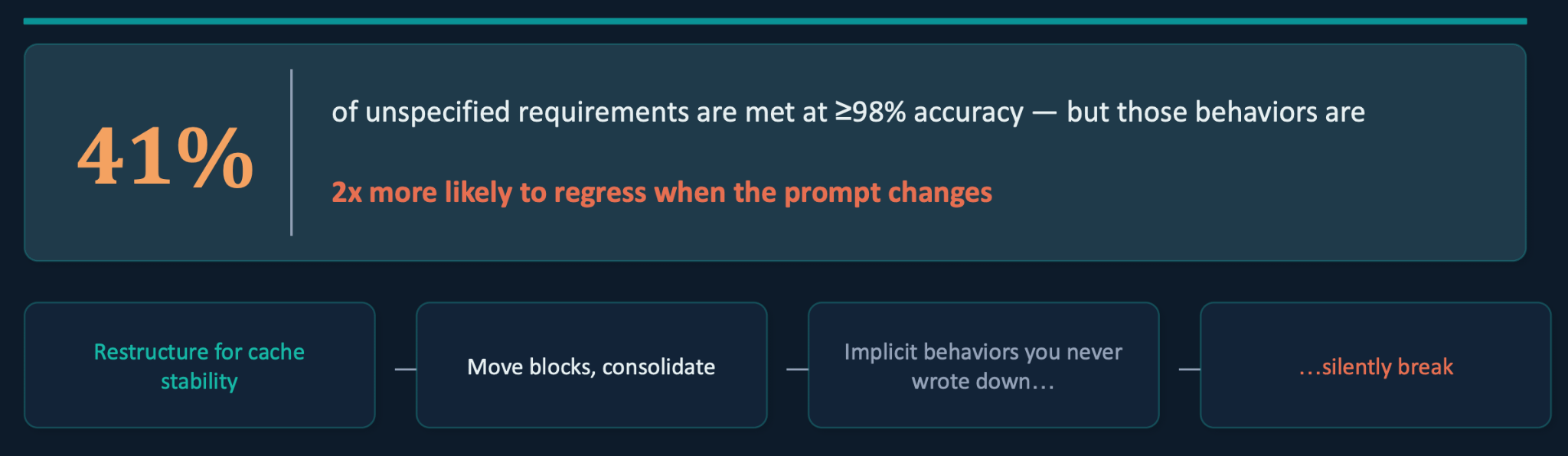
So before you restructure anything for caching, audit what your current prompt actually produces, add regression tests for those behaviors, and write down the things you truly care about. That is how you catch the underspecified behaviors and either specify them or protect them. The paper takes this further with a technique it calls Bayesian Prompt Optimization, which models each requirement as an on-off switch and works out which rules the model already follows on its own, then strips those from the prompt. That requirements-aware approach improved accuracy by about 4.8% over naively specifying everything.
Shared caches: the governance risk most teams miss
Caching carries a privacy risk that has nothing to do with cost and is easy to miss.
When one study audited 17 API providers, 8 showed detectable caching and 7 of those shared their caches across all users. That sharing is the problem. If two people send the same prefix and the second response comes back faster because the first person’s computation was reused, the timing itself leaks information. An attacker can submit a sensitive string, a proprietary code snippet or a specific medical term, and read the time to the first token to learn whether someone else recently sent the same thing. The risk is small for most workloads, but it is worth a second look if your prefix holds a sensitive system prompt, proprietary tool definitions, or internal business rules.
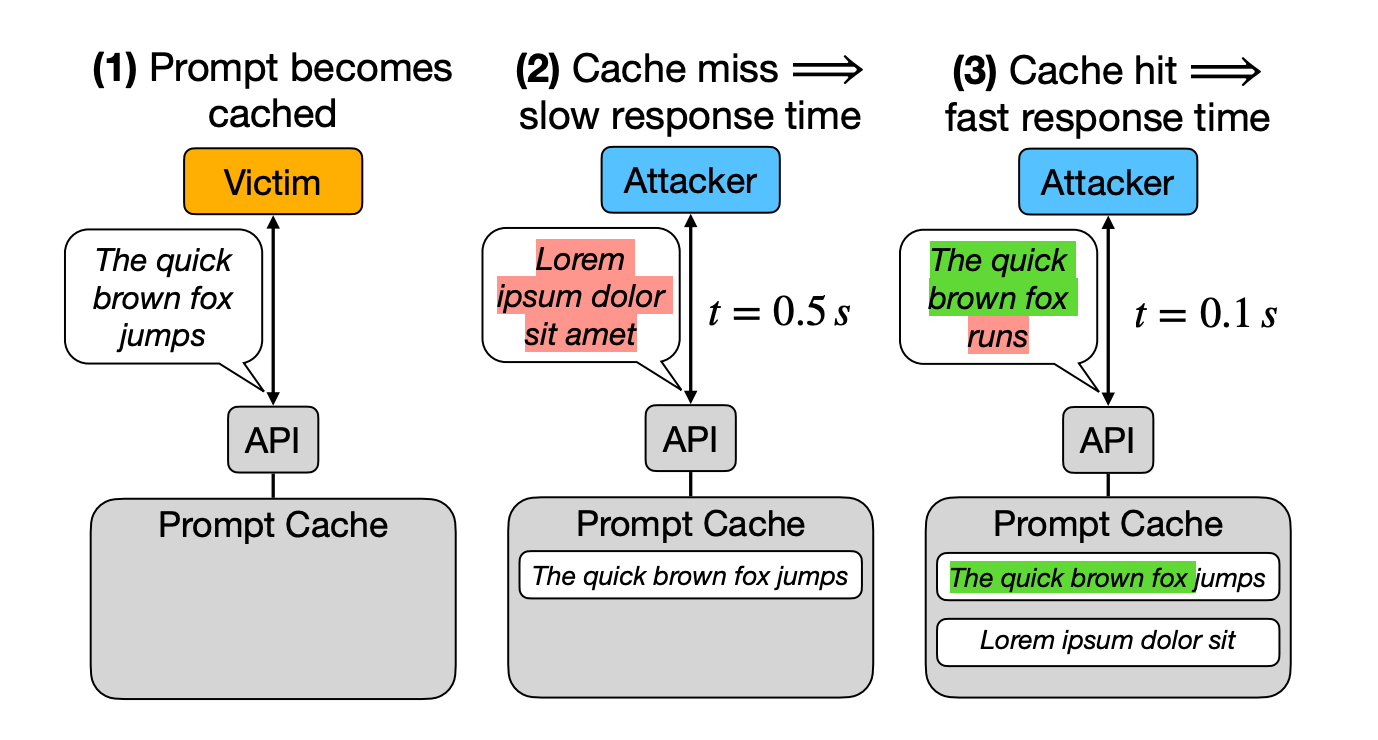
This has already exposed real secrets. It’s how researchers worked out that OpenAI’s text-embedding-3-small is a decoder-only transformer, a detail OpenAI never published, since only decoder models produce these prefix cache hits. If you are running a high-security deployment, per-user caching shuts this door. It is also worth asking your provider a few direct questions: is the cache isolated per organization, are timings normalized, and what is the residency guarantee?
Zooming out: the text layer is a real optimization axis
To see why any of this matters, it helps to zoom out. A recent blog post argues that the mutable text layer, the prompts, harness, caching, and retrieval, is an optimization axis in its own right. It isn’t just scaffolding around the “real” model work of pre- and post-training. It is an actual mechanism for improving the system, with its own scaling behavior.
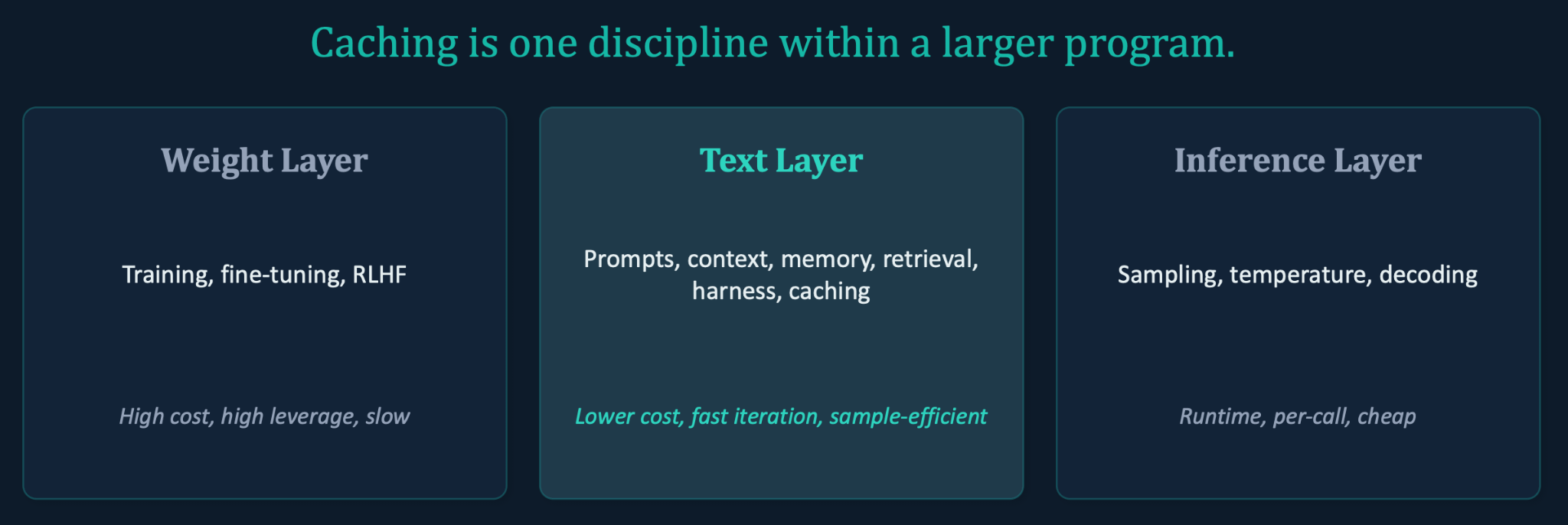
Think of three layers.
The weight layer is training, fine-tuning, and RLHF which is high cost, high leverage and slow to move.
The inference layer is sampling, temperature, and decoding which is runtime, per-call and cheap.
In between sits the text layer, the prompts, context, memory, retrieval, harness, and caching, which is lower cost, fast to iterate on and sample-efficient. Caching is one discipline within that middle layer.
What keeps showing up is that the teams shipping the most cost-effective agents in 2026 aren’t only picking better models. They treat the text layer with the same rigor they give to model selection, and in quite a few cases that’s enough to get a small model performing close to a large one, purely by optimising this layer well.
Where to start
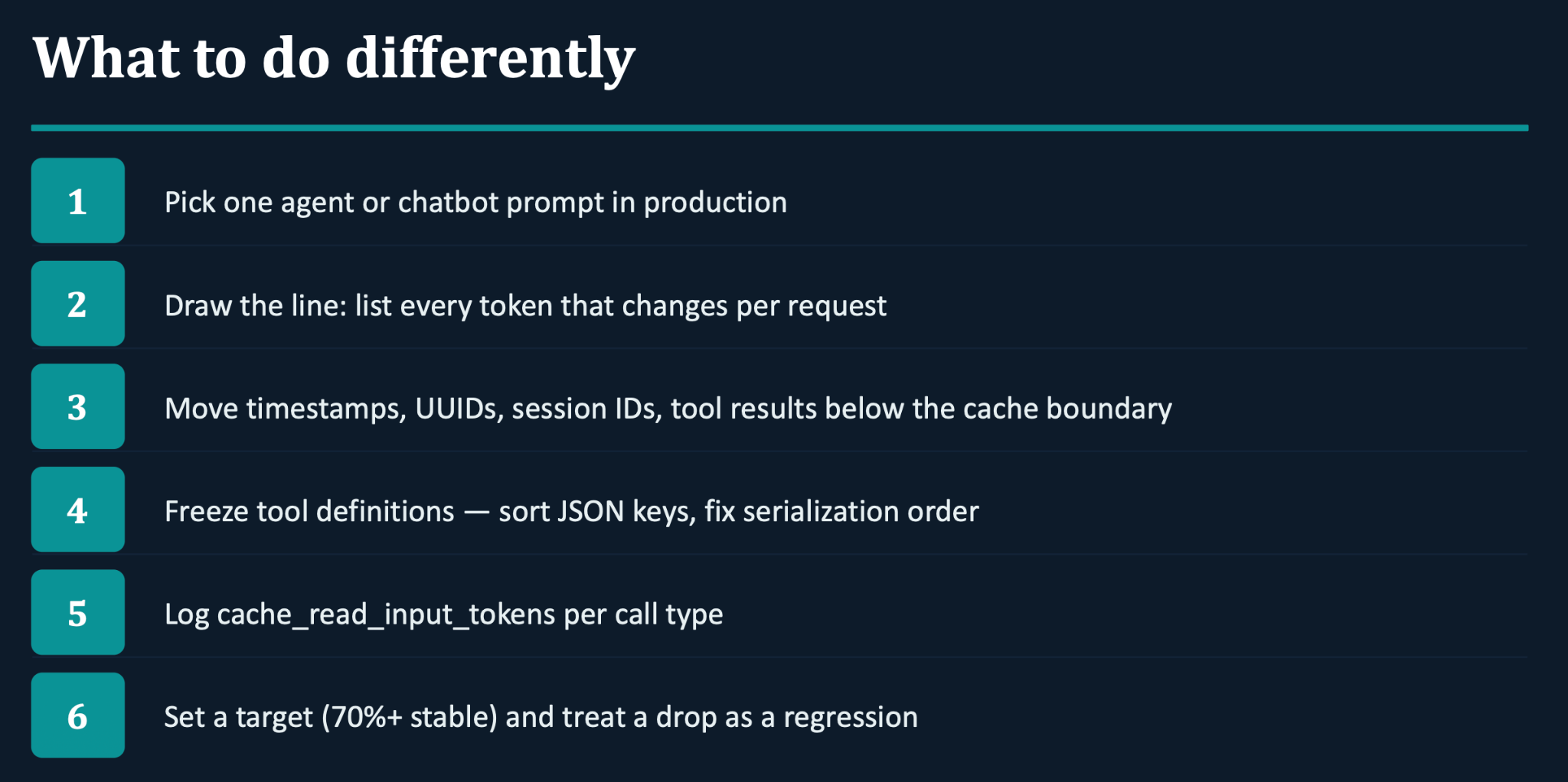
None of this needs a big project. Pick one prompt in production, work down the checklist below, and treat the cache-hit rate you end up with as a number you now watch.
This article grew out of a live Chai & AI session conducted by Prahitha Movva where we got into prefix caching, and how a setting that looks like a cost-only checkbox can quietly make your agent slower. All our Maven cohort members get access to our Chai and AI community, check out our cohort here.