Claude Code 101: A First Principles Approach
A working mental model for when to reach for CLAUDE.md, skills, hooks, and subagents


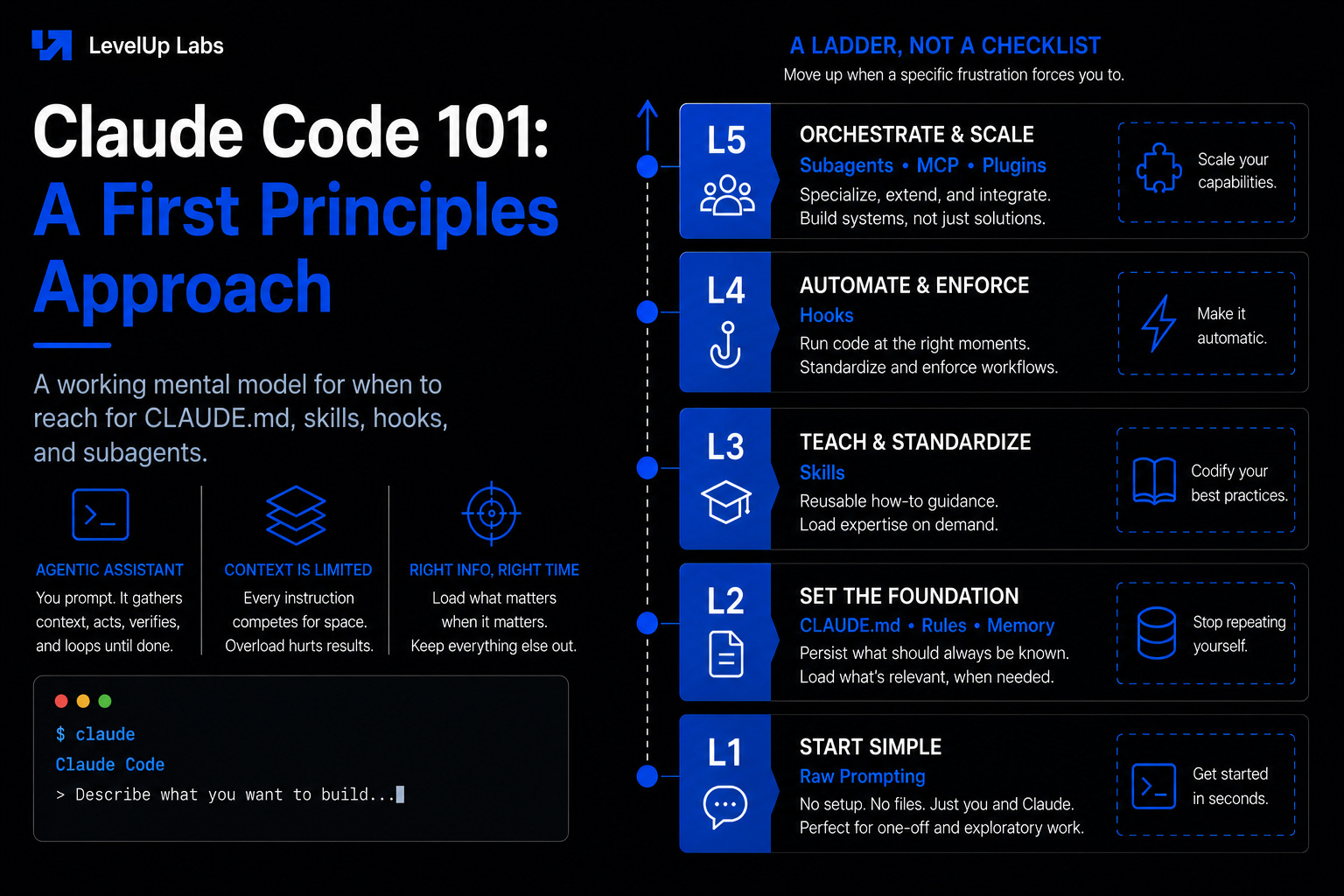
Most people meet Claude Code as a list of features to learn that just keeps growing. There is CLAUDE.md, rules, skills, hooks, subagents and MCP, with something new shipping almost every week. It is natural to feel like you are perpetually behind.
What makes everything click is realizing these are not separate features competing for your attention. They all answer the same question, one that grows louder the longer you use the tool, of how to keep the right information in front of the model and the wrong information out. That is what context management means, and once you see it, the features stop looking like a menu to work through and start looking like a ladder you climb one rung at a time, moving up only when a specific frustration forces you to.
Why the context window decides everything
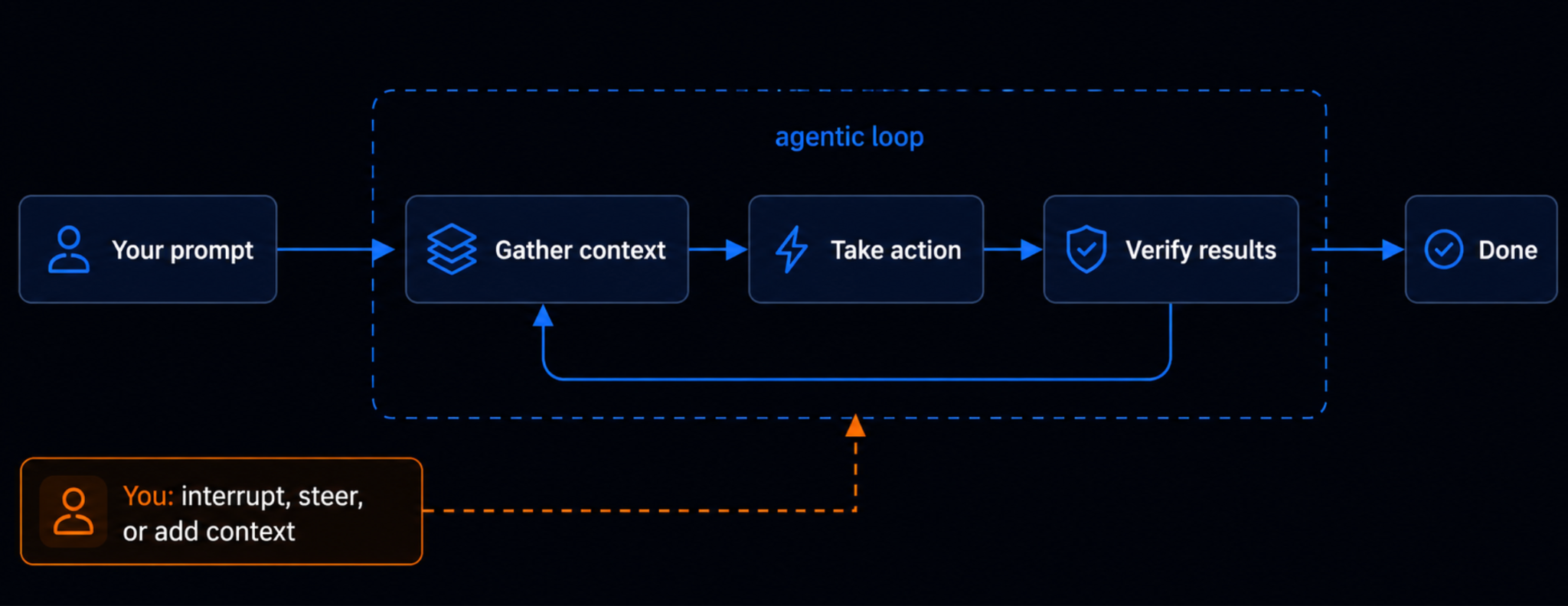
Claude Code is an agentic assistant that runs in your terminal. You give it a prompt, it gathers some context, takes an action, checks the result, and keeps looping until the work is done. What separates Claude Code from a chat window is that it can pull context straight from your files and codebase and take action across them, instead of you having to paste everything in by hand.
The catch is that the context window is finite. Every instruction you load competes for the same limited space, and when you overload it the model starts behaving like a person handed a fifty-page brief for a five-minute job. It skims and misses the thing you told it near the top because it was still working through something near the bottom.
This shows up in two ways that look alike at first but come from opposite causes.
The first is context overflow, which happens inside a single long session. As the window fills with everything you have said and done, the older material gets crowded out, and the model loses the thread of what you told it near the start.
The second is convention drift, which is almost the reverse problem. Nothing you tell the model gets saved anywhere lasting, so every new session begins from scratch, and a preference you mentioned once is simply gone the next time.
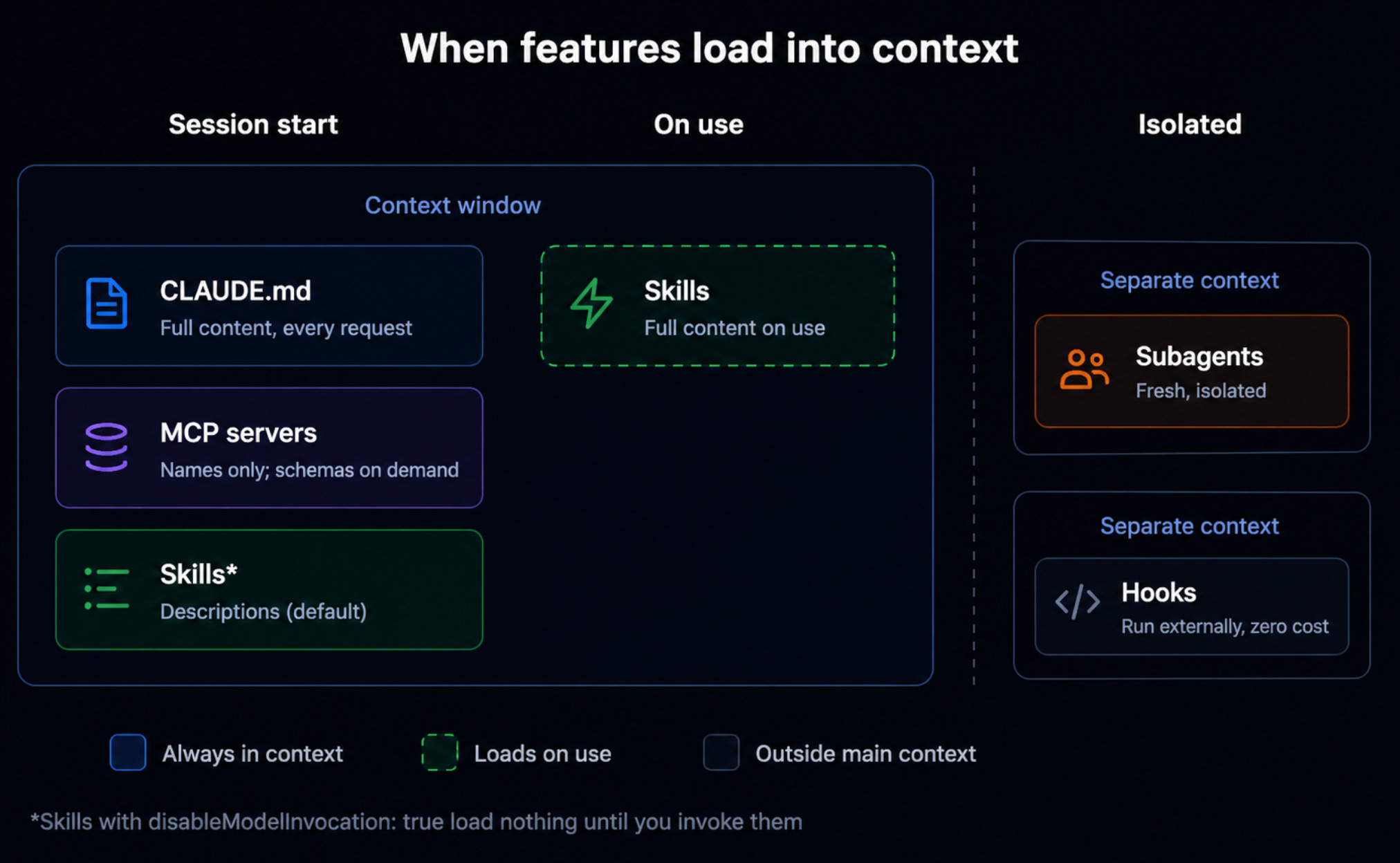
One problem is a window too full to hold everything you need, the other is having nothing at all that survives once the window closes. Every feature that follows works toward the same goal of loading the context that matters, at the moment it matters and leaving everything else out.
Level 1: Raw prompting
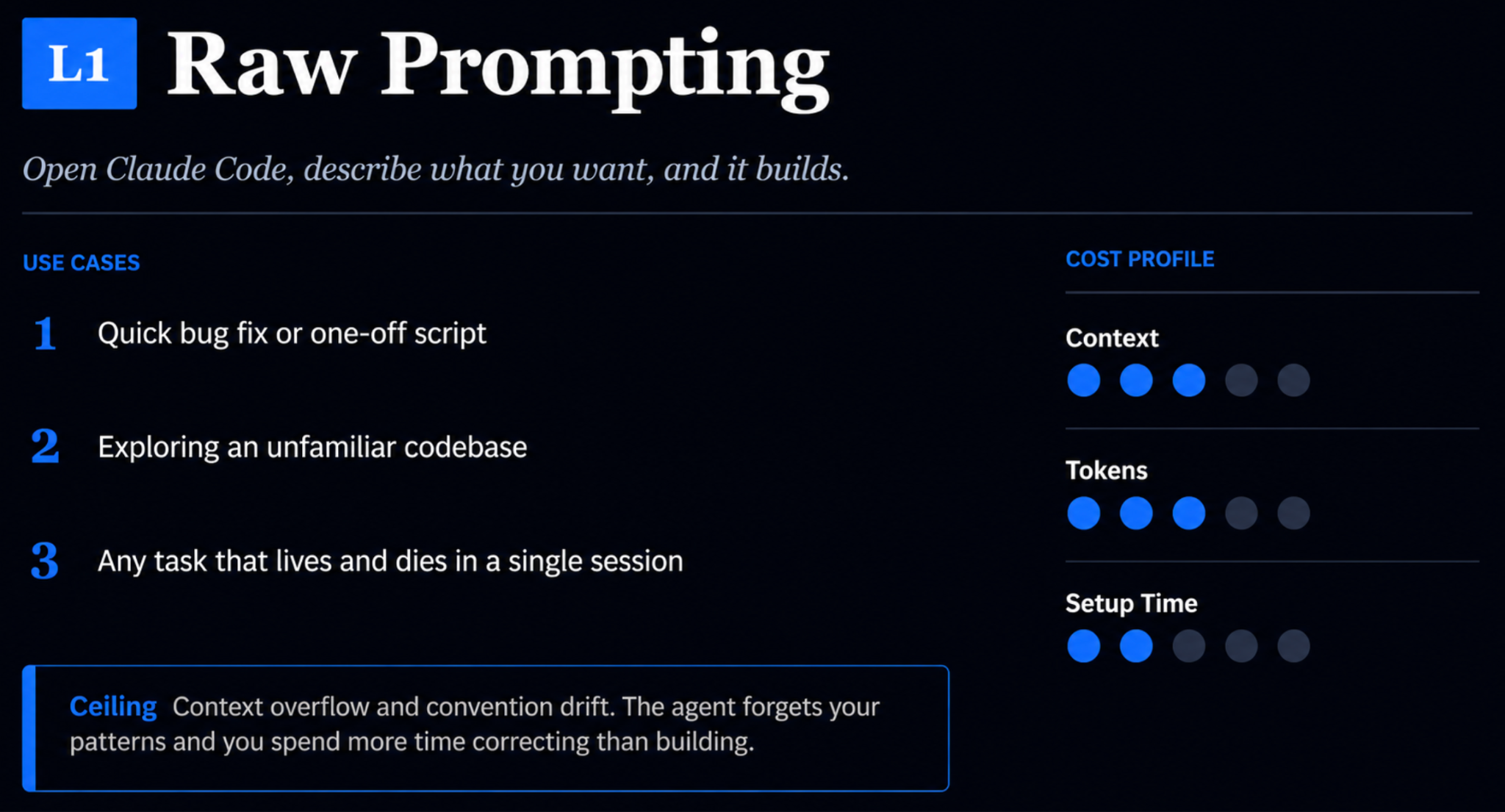
The first level is the one everybody starts with. You open the terminal, describe what you want, and it builds, with no setup, no files and no conventions to manage.
This turns out to be the right tool far more often than people like to admit. A quick bug fix, a one-off script, an afternoon spent exploring a codebase you have never seen before, anything that lives and dies inside a single session, all of it is well served by plain prompting. It is the foundation of how you talk to any model, and for trivial work it is genuinely all you need.
However, run anything substantial for long enough and you hit context overflow and convention drift. The agent forgets your patterns, you spend more time correcting it than building with it, and the friction is the signal that it is time to level up.
Level 2: CLAUDE.md, rules, and memory
The second level is where you stop repeating yourself and start writing things down.
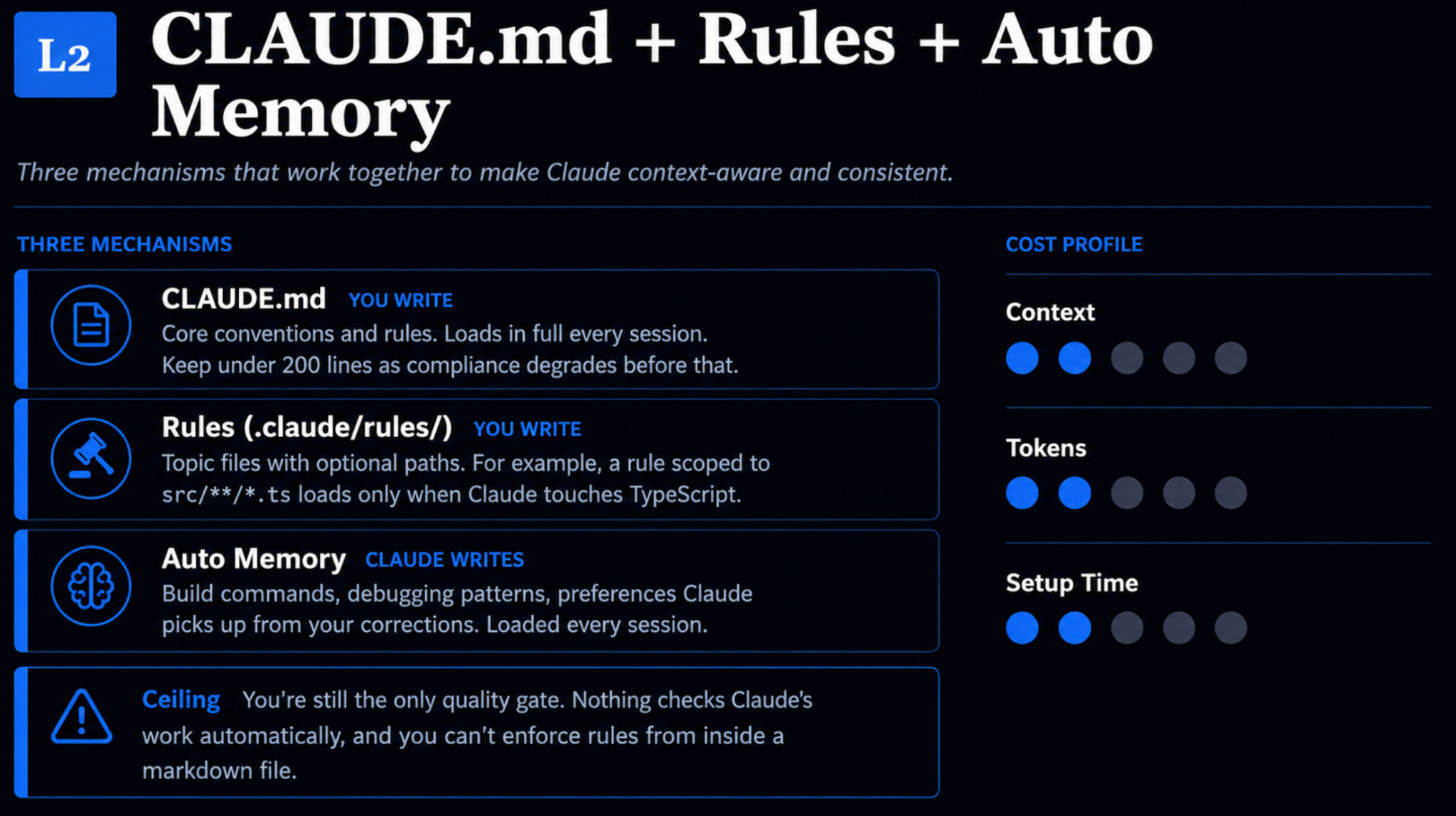
CLAUDE.md is the core document, and the easiest way to think about it is as the README for how you and the model work together. It loads in full at the start of every session, which means it should hold only the things that are true every single time. Things like your conventions, a short description of the project, and your non-negotiables. The common rule of thumb is to keep it under a couple hundred lines because a CLAUDE.md that runs long suffers from the same problem as a bloated prompt and the model simply stops listening partway through.
Three principles keep it strong, and they happen to be the same three that make any prompt strong.
Give it structure with clear headers and short bullets rather than long paragraphs.
Be specific, since “use two-space indentation” does far more for you than “format code properly.”
Keep it consistent, because the moment line one and line fifty start disagreeing, the whole file gets weaker.
Rules are how you keep CLAUDE.md from filling up with things that only matter some of the time. They live in a rules folder and load only when they are actually relevant, usually scoped to particular file paths. Imagine your default language is Python but one corner of the project needs TypeScript, which you barely know. You do not want an instruction like “explain TypeScript to me as if I were five” sitting in your context during every session about something else entirely, so you write it as a rule that wakes up only when TypeScript files are in play. You have taken something that does not need to be true all the time and made it true only when it matters.
The third piece is auto memory, and it is the one you touch the least. Claude writes it on its own, picking up build commands, debugging patterns, and the preferences it infers from your corrections. It is useful, but it is probabilistic, which means you are not fully in control of what it chooses to remember. When you want that control, a memory file you edit yourself gives it to you, though for most people the automatic version is good enough to leave alone.
You can write something into your CLAUDE.md and the model will follow it almost every time, but almost is the operative word. These are probabilistic systems, nothing checks the work for you, and you cannot enforce a rule from inside a markdown file no matter how clearly you phrase it. You are still the only quality gate.
Level 3: Skills
If there is one thing to take from all of this, it is skills.
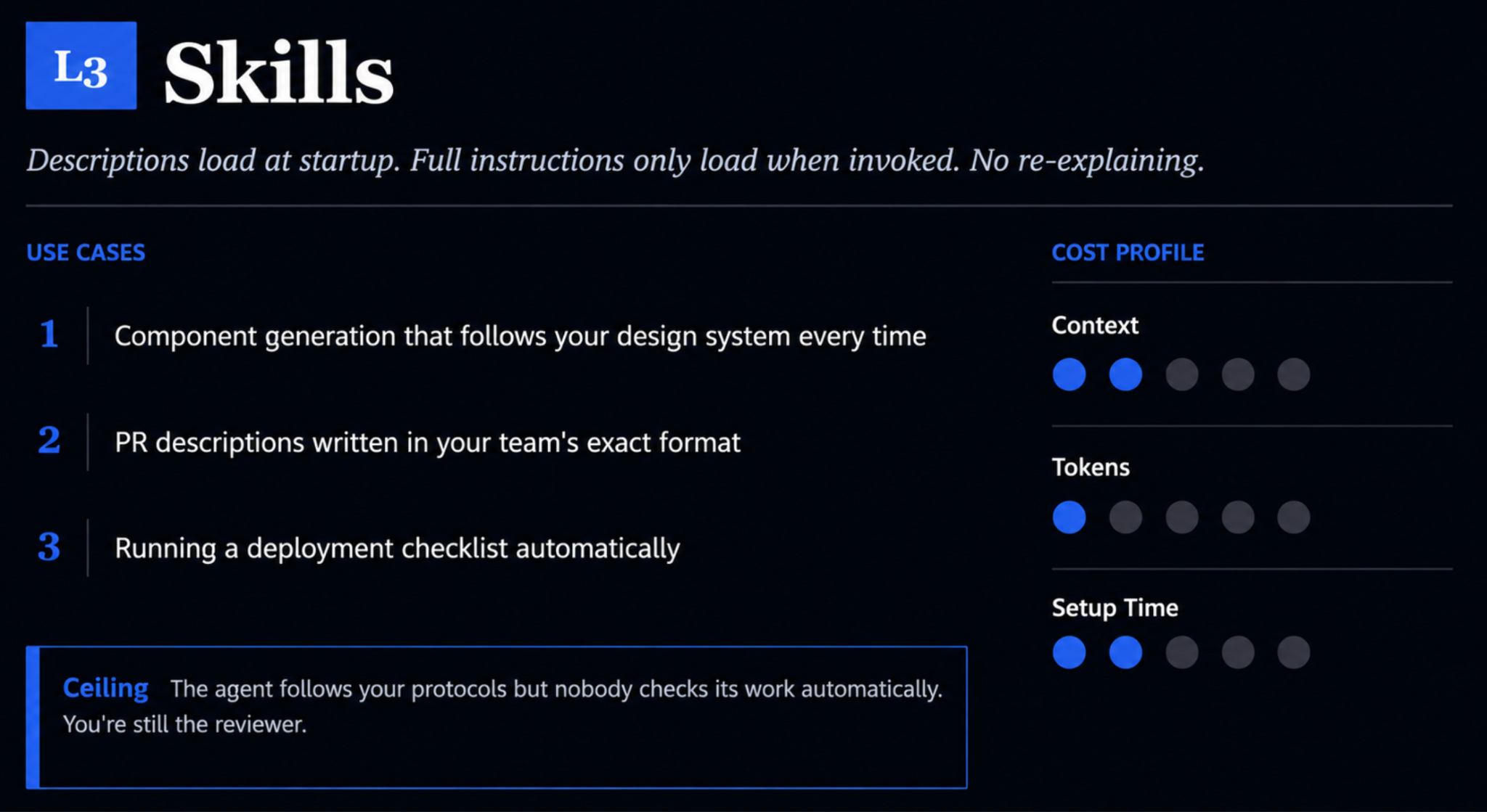
A skill is a workflow you have repeated often enough to be worth saving, and what makes it efficient is the way it loads. Only a short description sits in your context at startup, and the full set of instructions loads only when the skill is actually invoked. That means you can keep a large collection of skills around without drowning your context window, which is the very thing every level so far has been working toward.
Every skill is a single skill.md file. The top of it holds a short description in a YAML header, and below that sit the detailed steps describing what the skill does, what inputs it expects, and where it looks. You do not even have to write any of it by hand. Point Claude at a prompt you keep reusing, or paste in an old chat transcript, and ask it to generate the skill for you.
Say you write LinkedIn posts from session transcripts on a regular basis. Rather than pasting the same long set of instructions every time, you can build a LinkedIn writer skill that takes a transcript and hand back a properly formatted post. So now you can just say “write a LinkedIn post from this” and the skill will load itself. The same pattern covers a data-mapping task that repeats across spreadsheets, a deploy checklist, or PR descriptions in your team’s exact format.
People often ask how skills differ from slash commands, and the honest answer is that Claude Code now treats the two almost identically under the hood, to the point where the official docs have blurred the line between them. The mental model that still helps is that a command is explicit, where you type the slash command and it runs, while a skill is implicit, where you describe what you want and the model infers that the skill applies. They are the same file and the same setup, and the only real difference is whether you summon the thing or it shows up on its own.
Skills are powerful, but they remain probabilistic, so the model follows your protocol almost always while you stay the reviewer.
Level 4: Hooks
Sooner or later, almost always stops being good enough.
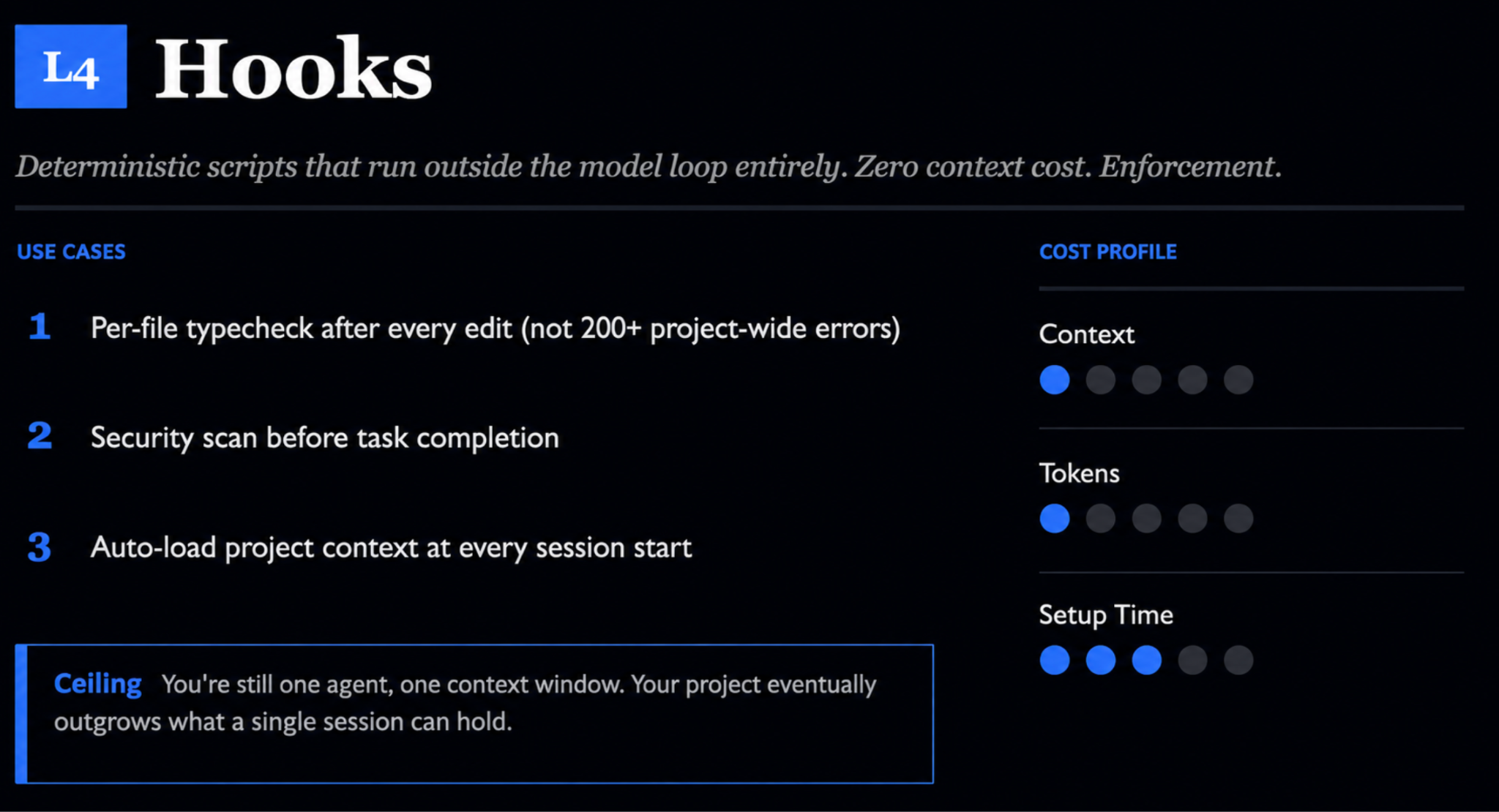
When you are working with code, or with anything where a mistake is expensive to clean up, you start wanting determinism, a rule that fires every single time rather than whenever the model decides it seems like a good idea. A hook gives you that. It is a shell command you define that runs at a specific point in the session and lives entirely outside the model loop. This lets it cost zero context and run without fail.
Hooks fire on lifecycle events. A post-tool-use hook runs right after the model edits a file, and a session-start hook runs the instant you open a session. What you do with them ranges from serious to trivial. On the serious end, a use case could be that after editing one file in a project of five hundred, you can run a type check on just that file rather than the whole project, so you catch what you just broke instead of drowning in two hundred unrelated errors. You might also run a security scan before a task is allowed to complete, or load project context automatically whenever a session begins. On the trivial end, a fun example could be that a small sound plays every time Claude finishes a task. It saves nothing and it enforces nothing, but when you have kicked off a job that runs for ten minutes and wandered off to do something else, that little ping pulls you back the moment the work is done. Determinism does not have to be dramatic to earn its place.
A hook makes a single agent more reliable, but it is still a single agent working inside a single context window, and at some point the project is simply too large for that to hold.
Level 5: Orchestration
The fifth level is the one most people never need, which is the most important thing to understand about it.
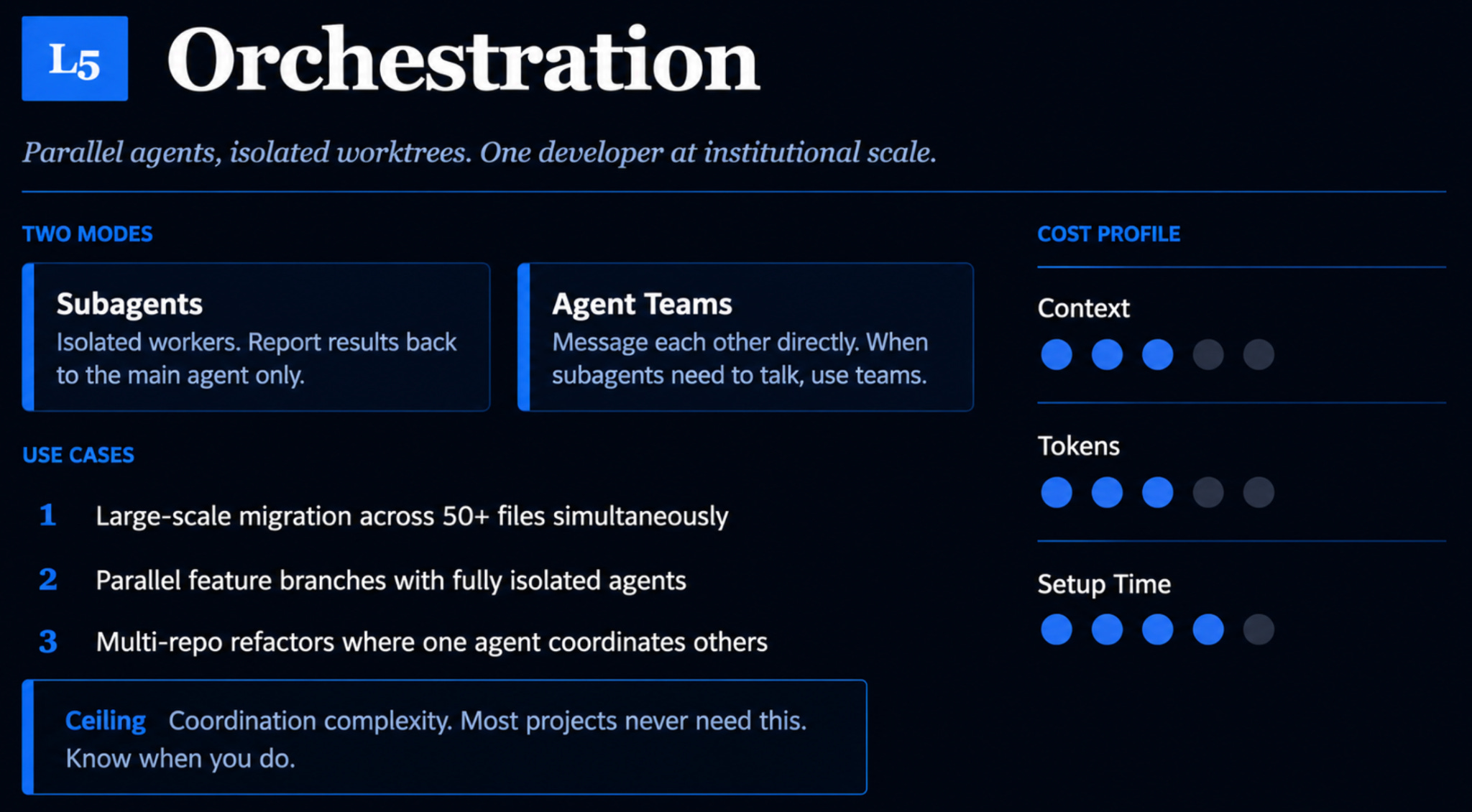
Think about how a team scales. One person works perfectly well alone, and a group of five still functions as a group, but somewhere around fifty or a hundred people you are forced to start thinking in terms of systems, functions and structure. Claude Code scales along the same curve. When a single agent and a single context window can no longer hold the whole job, you split the work across multiple agents.
There are two modes for doing this.
Subagents are isolated workers, each with its own context window, its own system prompt, its own tool access, and they report back to a main agent without ever talking to each other.
Agent teams go a step further and let the agents message each other directly, which you want only when the work genuinely needs them to coordinate.
The reason to reach for subagents comes back to context, same as everything else, because a side task that would otherwise flood your main conversation with output can run in its own isolated context and leave your main agent clean.
There is a real cost to all of this though. Subagents consume tokens, and agent teams consume far more, by some estimates seven or eight times what subagents use. The harder cost is coordination, since running fifty agents in parallel means a single failure can ripple across every one of them. The coordination problem is real enough that managing agents is quietly becoming a genuine skill in its own right.
MCP
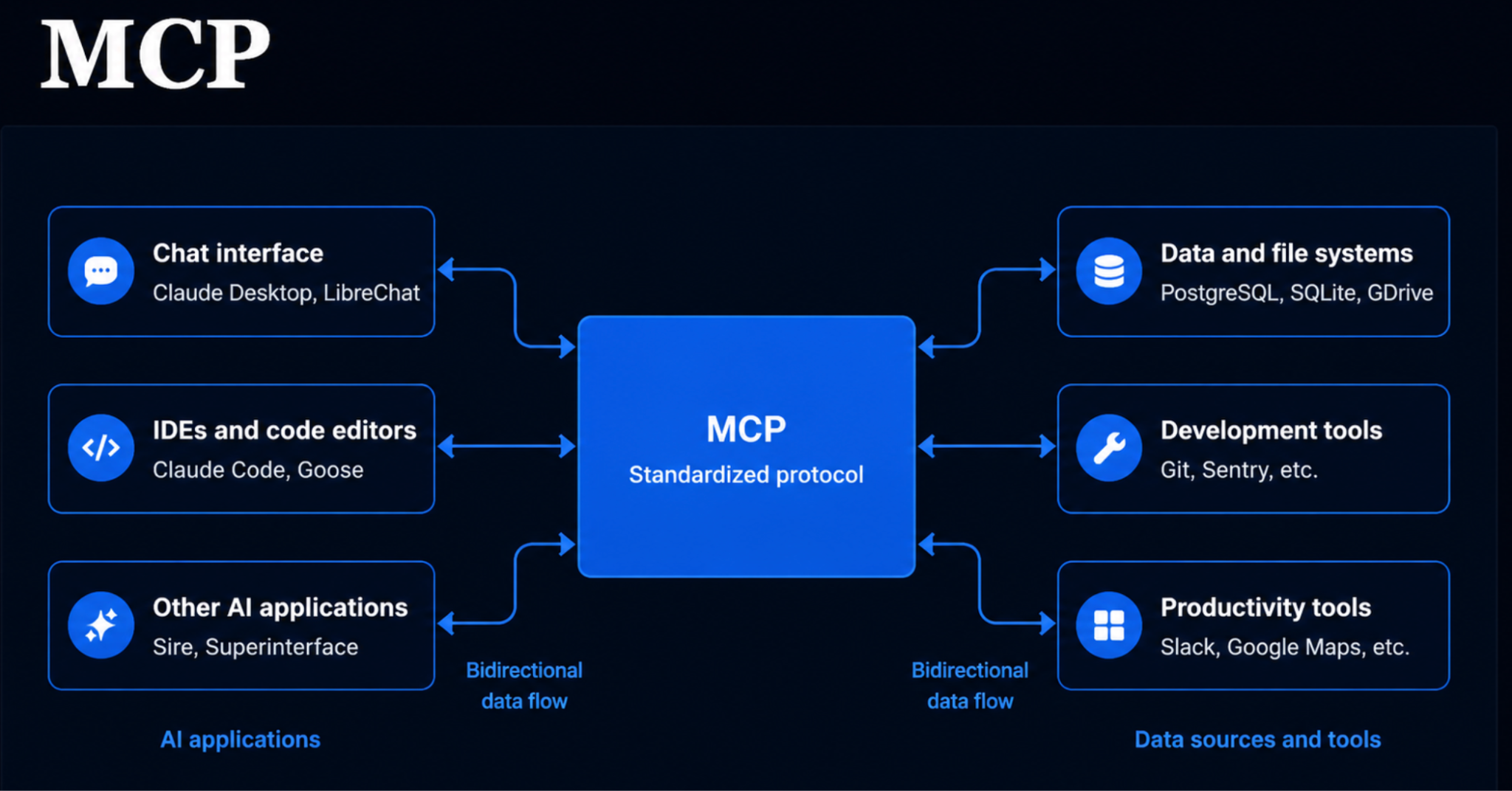
One term you will hear constantly is MCP, short for Model Context Protocol. It is not a level but the connection layer. Straight out of the box, Claude Code can see your local files, and MCP is how you give it access to everything else, from your Google Drive to your Notion, Slack and calendar.
People often ask whether MCP is just an API with a fresh coat of branding, and it is not, quite. It sits closer to a standardized wrapper around APIs, so you get the connection between tools without having to do the integration plumbing yourself. The value lands the moment your work lives somewhere Claude Code cannot reach on its own. If most of yours sits in Google Drive, an MCP connection lets it work there directly, instead of leaving you to copy and paste in and out all day.
The real power is in the combinations
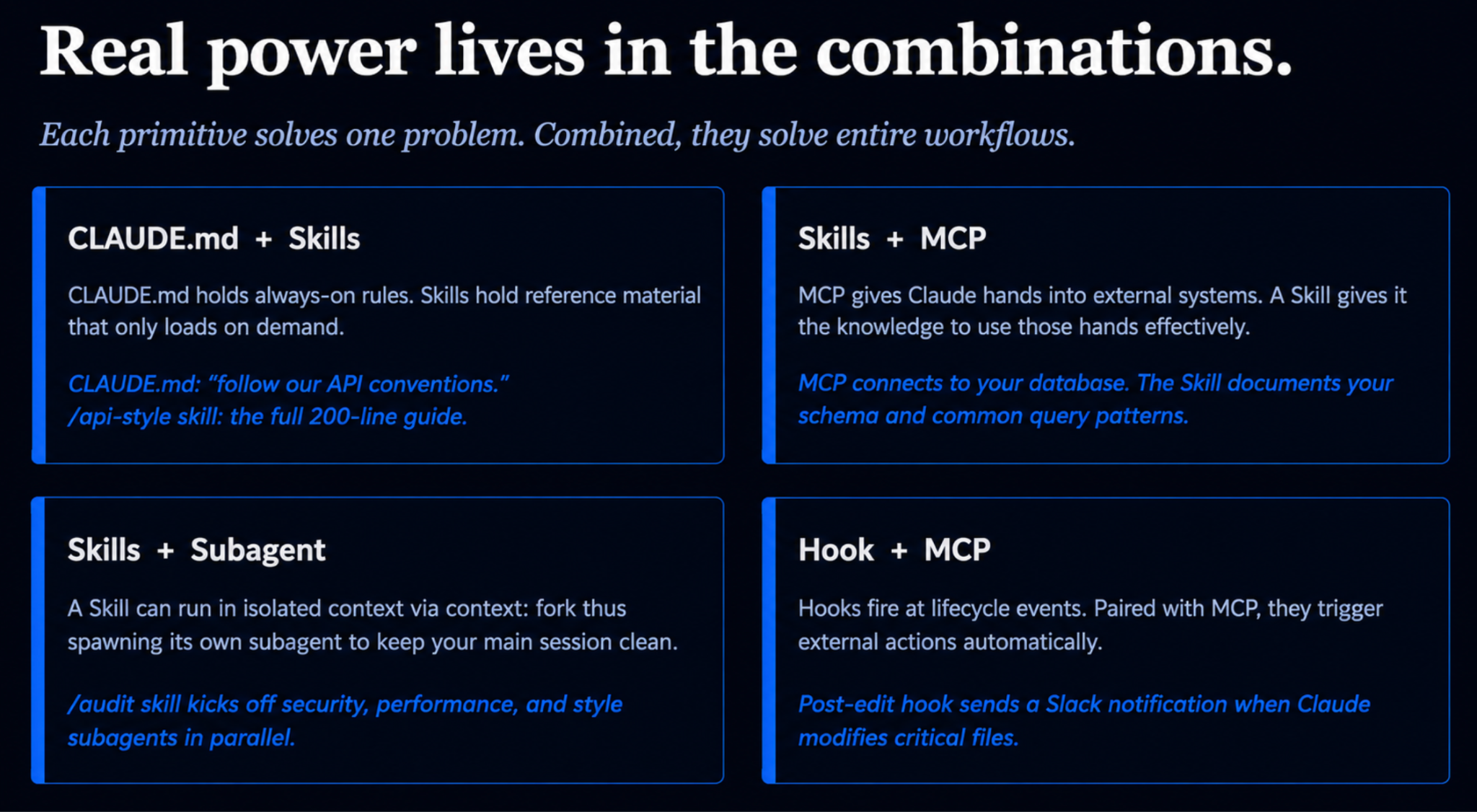
So far each level has stood on its own, but in practice none of them work in isolation. The setups that genuinely save you time come from wiring the primitives together, and the logic is the same context principle you have been following all along.
Take CLAUDE.md paired with a skill. Instead of pasting a long brand voice guide into CLAUDE.md, where it eats context and weakens the file, you leave one line saying to follow the brand guidelines and move the full guide into a skill that loads only when you are writing something brand-facing. The always-true instruction stays always-on, and the heavy reference shows up only when it is relevant. Skills and subagents pair the same way. A LinkedIn writer skill can check whether a topic is worth covering, then hand the actual writing to a subagent so the drafts never flood your main session. Hooks and MCP cover the determinism side, where a hook can fire an MCP call the moment someone touches a critical file and send a Slack alert automatically, all at zero context cost.
The features are not a list to choose between. They are parts of one system, and the judgment is determining which part carries which job.
How to choose: a working mental model
The levels are not a ladder you are obligated to climb to the top. They are a set of responses to specific kinds of friction, and the simplest way to hold the whole thing in your head is to think in terms of what you notice and what you add in response.
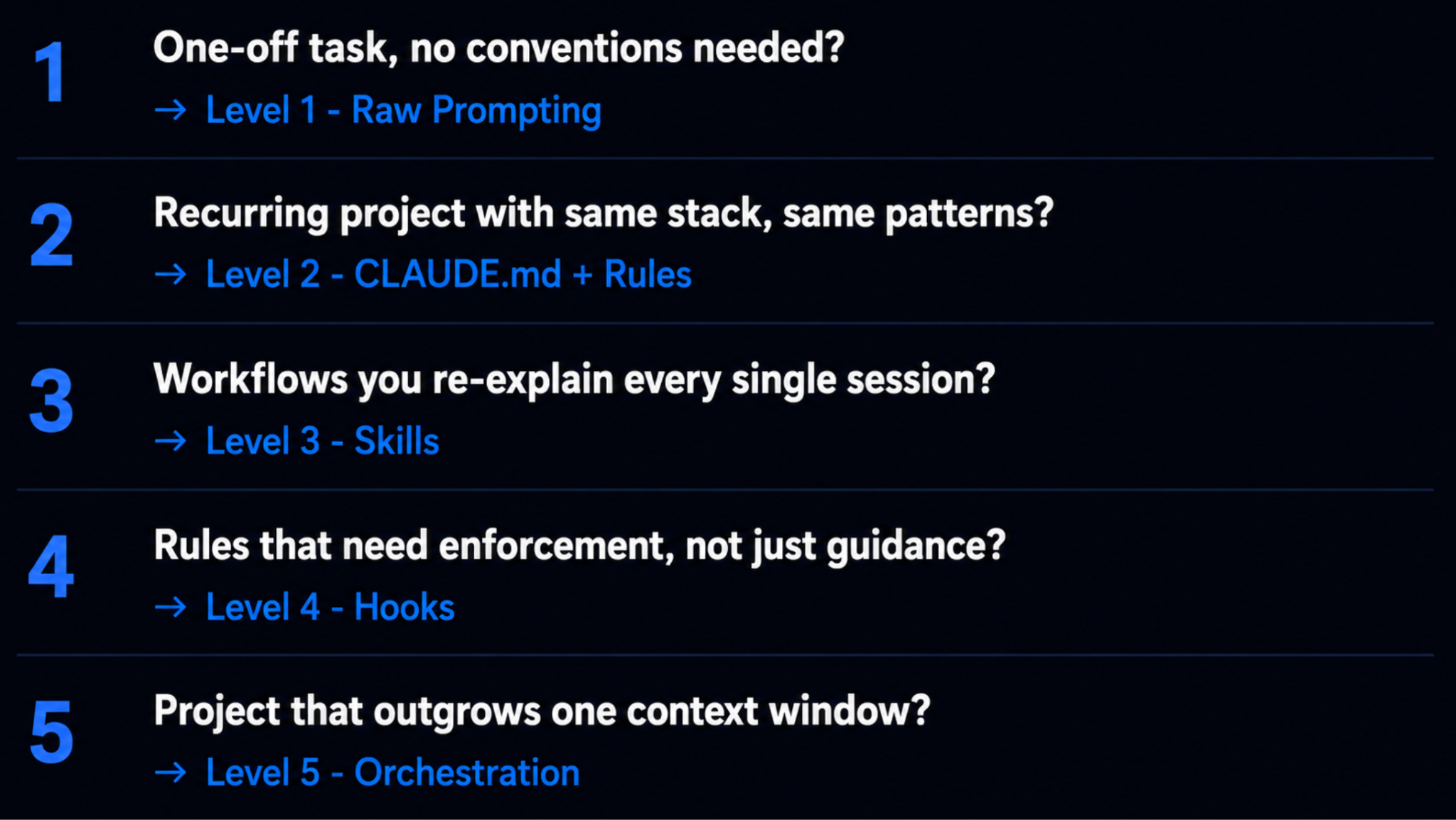
When the model gets a convention or command wrong twice and you want it fixed everywhere, that belongs in CLAUDE.md.
When you keep typing the same prompt, or pasting the same playbook a third time, that should become a skill.
When you keep copying data out of a tab the model cannot see, connect it through MCP.
When a side task keeps flooding your conversation with output, hand it to a subagent.
When something has to happen every time with no exceptions, enforce it with a hook.
When a second repo needs the same setup, package the whole thing as a plugin.
The single non-negotiable in all of this is a lean CLAUDE.md. You can run the init command in any project and Claude will draft one for you from the files already there, after which your job is to trim it down until it is dense with signal and free of filler. Everything else is need-based, added the moment the friction shows up rather than in anticipation of it.
For example, a preference like banning em dashes could live in CLAUDE.md, a rule, a skill, or a hook, so the question worth asking about every preference you hold is how much the thing actually bothers you, and in what setting. The model not knowing who you are or what you work on is a good example, and that kind of thing belongs at the user level where it stays true across every project you touch. Other things only bother you in a particular context. An em dash in a throwaway response is fine, but an em dash in a LinkedIn post is not, so that preference belongs inside the LinkedIn skill as a hard rule rather than in your global settings. Annoyances that are universal go high and broad, and annoyances that are specific to a context go into the skill or rule that governs that context.
The hardest part of scaling these tools is not the tools. It is the judgment underneath them, the call about what context belongs where and what is safe to hand off. Get that right, and you build systems that keep working even when you are not in the room.
If you want a running start, there are open-source starter setups that will generate a sensible configuration folder for you in about a minute, with separate paths for engineers and for non-technical builders.
References
https://github.com/SethGammon/Citadel
This article grew out of a live Chai & AI session run by Akshat Kharbanda where he worked through the levels of how to actually set up Claude Code. These sessions happen regularly, and they get into the details most tutorials skip. It’s invite-only for course alumni, but we’ll keep sharing highlights here every week.